Friday, 3 June 2022

An Online Marking Rubric Template


ICT ONLINE LESSON MARKING RUBRIC

Course Instructor’s name

Bongani Mhlanga

Course

Introduction to Computers

Date

28 May 2022

Time

Different times schedules from 10am to 5pm

Topic

Computer Storage

Lesson Title

Storage devices

Level

IDE Year 1 semester 1

Lesson Duration

 40 minutes

Lesson Total Marks for the lesson

40 Marks

Video-conferencing platform

Zoom Cloud Meeting

Prior knowledge/skills expected/assumed from the learners

-Know how to use gadgets for communication purposes.

-Have general understanding of Zoom Cloud Meeting.

-Know basic computer storages.

Lesson Objectives; By the end of the lessons the learner should be able to;


-Define computer storage.

-List at least 5 removable storage devices.

-List at least 2 non-removable storage devices.

-Explain and analyse the functions of a computer storage.

Assessment methods:


-Instructor evaluation of group performance

-Written work assessment using a quiz, group assignments and a group presentation document (Demonstrates knowledge of important content, show analysis, application, synthesis, and evaluation capabilities)

-Presentation skills (Demonstration of acquired skills, demonstration of ability to work collaboratively)

Course Instructor Preparation:

-Schedule and send Zoom meeting’s link to all the learner’s different groups prior to the actual date.

-Make sure that there is no clashing of scheduled times for the groups and short breaks between presentation.

-Network stability and fully charge gadget before meeting.

-Arrange with leaners about the most appropriate time for all presenting groups.

Lesson Development (timed steps and activities):

-5min (logging in) All learners

-3min (instruction and expectations) Facilitator

-10min (presentations by groups) Participating group

-2min (comments and observations) Facilitator

-5min (question and answer session) All learners

-3min (points emphasis and summary) Facilitator

-7min (assessment) Learners


Step

Marks

Course Instructor Activities

Learner Activities

Preparation


Accepting learners to the meeting

Learners are joining Zoom meeting

Introduction/Icebreaker


-Phone memory is full message on my phone, what could be possible problems with my phone and how can it be fixed?

-Introduce today’s topic.

-State instructions and expectations.

-Learners respond to the question that its storage is full and needs formatting or inserting a memory card for storage.

Body (with at least three steps – indicating active learning from learners)

A good presentation:

*Good PowerPoint Presentation design = (5marks)

*Clear definition = (2marks)

*Examples (3 internal storage & 5 external storage) = (8marks)


*Clear explanation of a function = (2marks)


*Good presentation and active participation per group =

(1 mark)


*Active participation =

(2 marks)

Step 1 - Groups present their work using screen sharing their PowerPoint presentations.

-Defining computer storage.


-Explain and list examples of internal storage and external storage.


-Explain functions of a computer storage.


Step 2 – Facilitator’s comments on the presentations


Step 3 – Question and answer/comments from learners.


-Storage is a process through which digital data is saved within a data storage device by means of computing technology.


-Removable storage is that which can be removed from the computer after storing data to it.

-Internal storage is that which cannot be removed from the computer.

-Examples of internal storage include hard drive (HD), Read Only Memory (ROM), Random Access Memory (RAM)

-Examples of external storage include flash drive, compatible disk drive (CD), phone, digital video display drive (DVD)

-Computer storage stores processed data temporarily or permanently.


-Learners take notes of facilitators comments.


-Students make comments and are given the opportunity to ask questions where they need clarity and make comments on the presentation.

Summary


-Facilitator emphasise the definition of storage.

-Emphasise the meaning of internal and external storage with examples and the function of computer storage.

-Students take notes

Formative assessment tasks QUIZ (Assessing individuals)

Facilitator instruct students to write responses to the following questions on the comments box:

*What is your definition of a computer storage? (3 marks)

*What is the function of a computer storage? (3 marks)

*Write 2 examples of internal and external storage. 1mark/example (4marks)

Total Marks for quiz = 10 marks

Conclusion

Thank the learners for the presentations and efforts made and encourage peer learning.

Take home tasks (Summative assessment)

In groups of 4, analyse the importance of storage to a computer device using Google Docs.

Submit (after the approval of the facilitator) via WhatsApp or email as PDF (10 marks) to be part of the student CA at the end of the semester


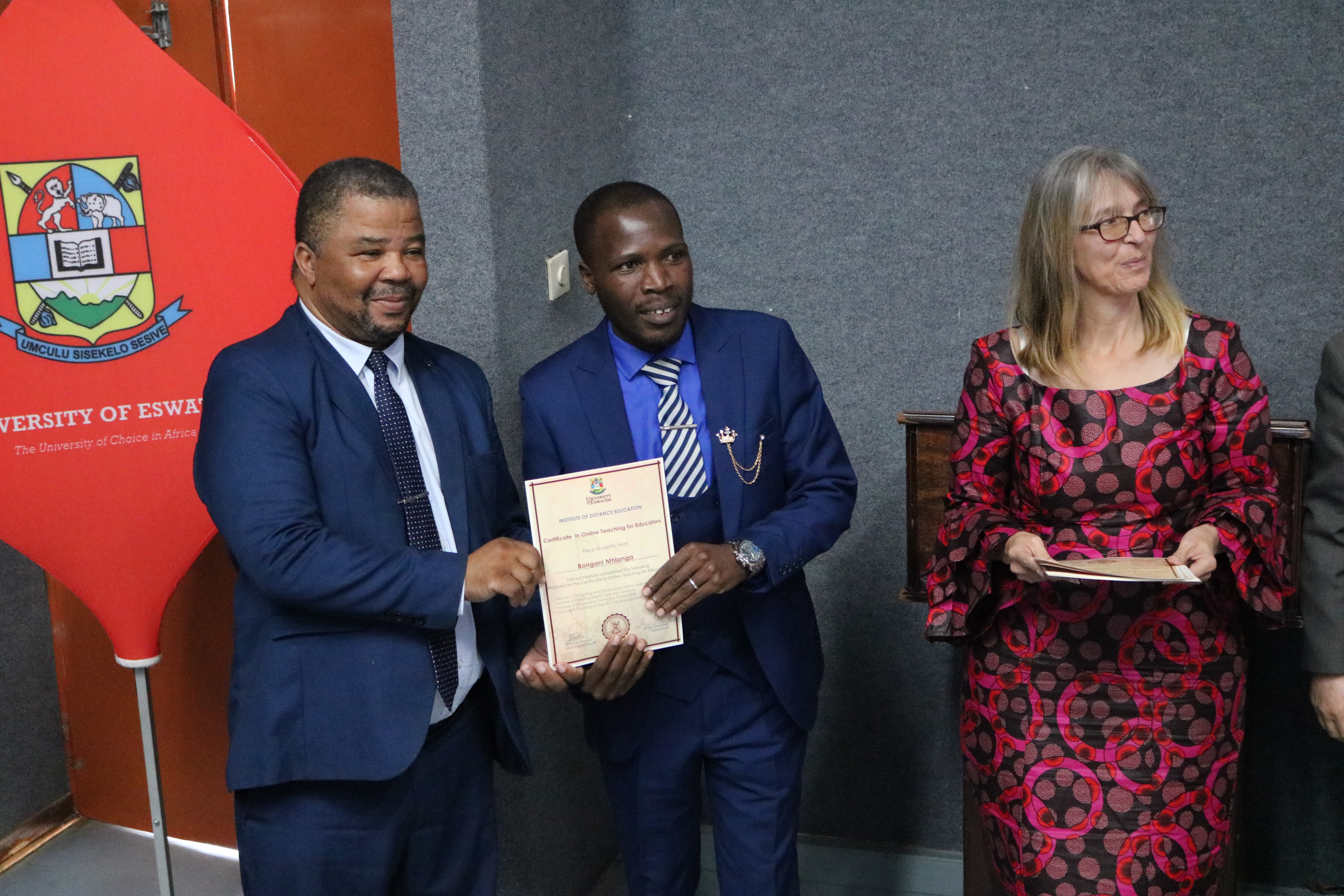
COTE Certificate handover by Professor Justice Thwala & Professor Karen Ferreira-Meyers

Friday, 27 May 2022

A Lesson Plan for a Live Online Lesson (For Certificate in Online Teaching for Educators)

ONLINE LESSON PLAN TEMPLATE

Course Instructor’s name

Bongani Mhlanga

Course

Introduction to Computers

Date

28 May 2022

Time

Different times schedules from 10am to 5pm

Topic

Computer Storage

Lesson Title

Storage devices

Level

IDE Year 1 semester 1

Lesson Duration

 40 minutes

Video-conferencing platform

Zoom Cloud Meeting

Prior knowledge/skills expected/assumed from the learners

-Know how to use gadgets for communication purposes.

-Have general understanding of Zoom Cloud Meeting.

-Know basic computer storages.

Lesson Objectives; By the end of the lessons the learner should be able to;


-Define computer storage.

-List at least 5 removable storage devices.

-List at least 2 non-removable storage devices.

-Explain the functions of a computer storage.

Teaching/Learning  Approaches:


-Group presentations

-Question and answer.

-Discovery learning.

-Classroom discussions.

Teaching/Learning Aids:


-Zoom App

-Pictures and short video clips of storage devices

-PowerPoint presentation

Course Instructor Preparation:

-Schedule and send Zoom meeting’s link to all the learner’s different groups prior to the actual date.

-Make sure that there is no clashing of scheduled times for the groups and short breaks between presentation.

-Network stability and fully charge gadget before meeting.

-Arrange with leaners about the most appropriate time for all presenting groups.

Lesson Development (timed steps and activities):

-5min (logging in) All learners

-3min (instruction and expectations) Facilitator

-10min (presentations by groups) Participating group

-2min (comments and observations) Facilitator

-5min (question and answer session) All learners

-3min (points emphasis and summary) Facilitator

-7min (assessment) Learners

Step

Course Instructor Activities

Learner Activities

Preparation

Accepting learners to the meeting

Learners are joining Zoom meeting

Introduction/Icebreaker

-Phone memory is full message on my phone, what could be possible problems with my phone and how can it be fixed?

-Introduce today’s topic.

-State instructions and expectations.

-Learners respond to the question that its storage is full and needs formatting or inserting a memory card for storage.

Body (with at least three steps – indicating active learning from learners)

Step 1 - Groups present their work using screen sharing their PowerPoint presentations.

-Defining computer storage.


-Explain and list examples of internal storage and external storage.


-Explain functions of a computer storage.


Step 2 – Facilitator’s comments on the presentations


Step 3 – Question and answer/comments from learners.

-Storage is a process through which digital data is saved within a data storage device by means of computing technology.


-Removable storage is that which can be removed from the computer after storing data to it.

-Internal storage is that which cannot be removed from the computer.

-Examples of internal storage include hard drive (HD), Read Only Memory (ROM), Random Access Memory (RAM)

-Examples of external storage include flash drive, compatible disk drive (CD), phone, digital video display drive (DVD)

-Computer storage stores processed data temporarily or permanently.


-Learners take notes of facilitators comments.


-Students make comments and are given the opportunity to ask questions where they need clarity.

Summary

-Facilitator emphasise the definition of storage.

-Emphasise the meaning of internal and external storage with examples and the function of computer storage.

-Students take notes

Assessment tasks

Facilitator instruct students to write responses to the following questions on the comments box:

*What is your definition of a computer storage?

*What is the function of a computer storage?

*Write 2 examples of internal and external storage.

Conclusion

Thank the learners for the presentations and efforts made and encourage peer learning.

Take home tasks

In groups of 4, write the importance of storage to a computer device using Google Docs.

Submit (after the approval of the facilitator) via WhatsApp or email as PDF

References

https://www.techopedia.com/definition/1115/storage                                     


https://www.youtube.com/watch?v=-eW4H0U2M9g

Lesson Evaluation (Strengths/Weaknesses)

-Technical problems like network and data during presentation.

-Flexible schedule time for each and every group’s presentation.


COTE COHORT 3 GRADUATION AT UNESWA (15 July 2022)

COTE Certificate handover by Professor J. Thwala and Professor Karen Ferreira Meyers

Tuesday, 2 February 2021

BACHELOR OF EDUCATION SECONDARY-HUMANITIES RESEARCH PROPOSAL AND PROJECT

 PROPOSAL AND PROJECT WRITING FOR B.ED STUDENTS

Coming up with a successful proposal is so strenuous for many students. It is a requirement that every Degree student has to go through before graduating. Jansen (2020) describes a Research Proposal as a simply structured, formal document that explains what you plan to research (i.e. your research topic), why it's worth researching (i.e. your justification), and how you plan to investigate it (i.e. your practical approach). 

After doing a Research Proposal with the help of the Faculty Supervisor, the student is expected to work on producing a Research Project. This is simply unpacking the proposed study following the format prescribed in the Research Proposal. It takes a lot of dedication and patience to write a project. So one can simply explain the Research Project as a continuation of the Research Proposal and doing what the researcher proposed to do to come with findings that will add to information knowledge in that area of research.

As a graduate from a the University of Eswatini 2019, I went through the same process of writing the Research Proposal and presenting it to the Faculty Panel. After successfully completing my Proposal, I continued to produce my Research Project which I passed and I am willing to share with everyone especially undergraduate students who may need a clue on writing a Research Proposal and a Research Project.


MY RESEARCH TOPIC 

STUDENTS’ PERCEPTIONS TOWARDS THE USE OF ICT IN BLENDED LEARNING AT HIGHER EDUCATION INSTITUTIONS: THE CASE OF UNESWA IDE STUDENTS


AIM OF THE STUDY

The aim of the study was to investigate UNESWA IDE students’ perceptions towards the use of ICT in blended learning.


OBJECTIVES OF THE STUDY

The objectives of the research were to:

1. Explore students’ perceptions on the use of ICT in blended learning.

2. Investigate students’ challenges with the use of ICT in blended learning.

3. Analyse how students can overcome those challenges.


RESEARCH QUESTIONS

This study was seeking to answer three research questions:

1. What are the students’ perceptions about the use of ICT in blended learning?

2. What are the students’ challenges with the use of ICT in blended learning?

3. How students can overcome those challenges?


To access and download my Research Proposal and Research Project, you can click the Google Drive Logo, it is FREE!!!


REFERENCES

Jansen, D. (2020). What Exactly is A Research Proposal?: A Plain-Language Definition and Explaination With Examples. accessed on February 02, 2021 at What Is A Research Proposal? A Simple Definition - Grad Coach

Wednesday, 20 January 2021

MR BONGANI MHLANGA'S PERSONAL BIOGRAPHY

 HISTORICAL AND EDUCATIONAL BACKGROUND

Bongani Mhlanga is from the Kingdom of Eswatini. He stays in Nyakatfo in the Hhohho Region. He graduated from the University of Eswatini (UNESWA) in 2019 with a Bachelor of Education Education—Majoring in Religious Education & History; obtaining a Second Class First Division 2:1. He also possesses an International Diploma in Computer Studies which he got from the Institute of Development Management (IDM Eswatini) with one (1) Distinction, two (2) Merits and five (5) Passes. He has a Diploma in Biblical Theology, Christian Lifestyle and Ministry from Christian Life College. Other certificates that he has include the Certificate of Completing Training and Demonstrating Leadership on Improving Maternal and Child Health in the Community from Elizabeth Glazer Community Leader Institute. Advanced Cybersecurity Training for Teachers Certificate, Self-directed learning for higher education, Certificate in Online Teaching for Educators & Open Educational Resources for Online Learning Certificate.


EXPERIENCE AND SKILLS

Bongani Mhlanga is passionate about Information Technology and has been exposed to a number of ICT activities. For example, he has helped lecturers to use technological tools for teaching while he was still a student at UNESWA. These includes the use of Blogs, audio-visuals and conference calls to name a few. He has helped some schools to have Blogs and YouTube Channels, and he has trained teachers on the effective use of such technologies as well. He has also created Blogs and YouTube Channels for churches to publish articles of reports and other important information and post videos for public consumption which also serves as their archives. He is currently helping some students from different Institutions of Higher Learning with basic computer literacy skills, Religious Studies tasks and projects writing.

He has a personal Blog where he publishes different material with the help of experts including lecturers and teachers. The Blog is mostly viewed by students in the field of IT, Education, History and Religion. He is currently working as a Computer Technician for Absa Investments (Pty) Ltd with the listed companies; Oil One Swaziland, Masahe Timber Treaters and Piggs Peak Motors. His duties include fixing technical problems, designing information, invoicing and management systems. He also helps in the tender processing for any bidding for the afore mentioned companies. He facilitates Virtual conferences and designing adverts posters and brochures for the companies.


VISION

Bongani Mhlanga’s dream is pursuing a Master of Art in Religious Studies and is mostly interested in the area of Science of Religion, African Traditional Religion, World religions and Biblical Studies. His other burning academic interest is on Master of Education in Instructional/Educational Technology. This is ignited by the diverse society that is so engulfed with major religious conflicts that poses danger and a threat to global security and peace. The 21st century learning is forcing educators to adopt Technologies in Teaching and Learning, so there is a growing demand of Instructional Technologists to sustain the new trend and embrace the challenges that comes with them.


Wednesday, 25 November 2020

A PERSONAL REFLECTION PORTFOLIO FOR CURRICULUM STUDIES IN HISTORY


UNIVERSITY OF ESWATINI


BONGANI MHLANGA

BACHELOR OF EDUCATION SECONDARY

145650


PORTFOLIO FOR CURRICULUM STUDIES IN HISTORY

EDC 476


AUTOBIOGRAPHY

Bongani Mhlanga is a Bachelor of Education 4th year student at the University of Eswatini. I possess an International Diploma in Computer Studies and have a vast working experience with Non-Governmental organizations (NGOs) like the National Emergency Response Council on HIV and AIDS (NERCHA). I fell in love with teaching while doing my day to day duties especially when dealing with community Orphaned and Vulnerable Children (OVCs) and realized I had to jump in to the teaching profession to impart and transform the lives of the young minds in schools. This is because education is seen as a fundamental instrument for societal transformation in any country. 

Having done my Degree programme, I have been totally transformed and I am going to bring a portfolio of my experiences, the skills and capabilities that I have harvested from the course, Curriculum Studies in History throughout my degree journey. I will include some tangible examples as evidence of the achievements I got from the course.


A PERSONAL REFLECTION

The course Curriculum in History has been so helpful in transforming my career. It has greatly influenced the way I think and understand about the 21st teaching and learning. I have greatly harvested many skills from the beginning of the course in year two until final year. Skills include the self-understanding of a History teacher, the art of teaching the skills needed in in History, the way to do lesson plans and scheme of work in the subject. I have also learnt to handle sources, to use teaching aids and student involvement methods.

The use of sources in History is a fundamental aspect of it that forms a bigger portion of teaching and learning of the subject. I have learnt in the course series, the importance of using sources in History and the art of selecting the best sources for a particular topic. For example, the use of journals when teaching about the history of Eswatini, and other sources rather than relying on the limited sources that are available. In this piece of work, I will be presenting a portfolio of skills and experiences in the course with tangible evidence to most of my shared experiences and skills.


WHAT IS IT TO BE AN EFFECTIVE HISTORY TEACHER?

Research offered a plethora of definitions of an effective teacher. Clark (1993, p. 10) wrote that, “Obviously, the definition involves someone who can increase student knowledge, but it goes beyond this in defining an effective teacher.” Being a history teacher is not as easy as one may think. It is a very complicated and sensitive subject. There are skills that a history teacher has to acquire before going out to teach the subject in schools. Doing the course has greatly empowered me with a variety of such skills. I have learnt to understand my strengths and weaknesses.

Collins (1990), while working with the Teacher Assessment Project established five criteria for an effective teacher: is committed to students and learning, knows the subject matter, is responsible for managing students, can think systematically about their own practice, and is a member of the learning community. In the series of courses in Curriculum in History, I have been well equipped to be competent enough to become effective history teachers. Content knowledge is a requirement for every history teacher; this is made possible by employing a lot of strategies that we learnt in the course. The key one is being up to date with knowledge and this is through reading books, journals, articles and daily newspaper publications. I have set my phone to a mode that enables me to read a series of daily publications which I make sure I read every day to keep myself updated with current affairs.

Another skill I have learnt is that of being reflective as a history teacher. After every lesson, it is expected that an effective history teacher reflect on the lesson he/she was facilitating on. This is because it enables them to do introspection and see where a lesson went wrong for a more refined next lesson or even a re-approach to the same lesson. Personally, I have learnt to be reflective beyond the academics, but to reflect from all that I did in every particular day and that helps me to grow in understanding my strengths and weaknesses. 

Coming to the teaching of History, I have learnt to use other teachers where I identify some limitations in addressing a particular topic. As I am new to the profession, I invited the Head of Department (HOD) to address issues about the art of answering History topics. I realized after giving them a test that they were listing and making some bullets and few had a clue about concepts of describing, explaining, and evaluating a question. It was through a personal reflection after getting the nature of responses that are not required when answering History test questions.


THE ART OF TEACHING HISTORY

Moreover, the teaching of history goes hand in hand with some expected skills that need to be developed in the learners. As I an new to the profession, the course has empowered me with skills to teach the subject effectively. History can be an inspirational and rewarding subject, yet in others it can seem dry and of little relevance. Learning to teach History in the Secondary levels helps teachers to learn to teach History in a way that pupils will find interesting, enjoyable and purposeful.

I have learnt a lot of student involvement methods of teaching History in a way that will captivate the interest of the learner. These include student involvement methods which enable the learners to feel so relaxed and free while learning because learners learn easy when the mood is so relaxed. There is a method that I have attached to my portfolio which was marked by the course lecturer. It was designed to involve learners during a lesson. The student involvement method was tried in a classroom situation and it was so effective.


PREPARATION OF A LESSON PLAN AND A SCHEME OF WORK IN HISTORY

Teachers begin planning a lesson by considering the context of teaching and the learning situations most likely to interest their pupils (Taylor, 1970).  Lesson planning is one of the key skills every teacher should have. Lesson plans differ from subject to subject. The history format of planning a lesson is so simple and easy to master while communicating to the teacher about the steps he/she will be following as he/she deliver the lesson. It is also informing and constructive in making sure that as a teacher, I do my best in teaching the History subject in the classroom situation.

A lesson plan comes from the scheme of work which is another complex teaching tool where topics are broken down to small chunks of teachable items. It also set the target dates of teaching those topics. On that regard, a scheme of work is as helpful as a reference point for a history teacher. It is not easy to do but so helpful to organize the way to teach the History Syllabus. The course has fully equipped me with a comprehensive knowledge of formulating a good scheme of work with all the components of it and the art of managing it. The scheme of work that I have attached as evidence in my portfolio is a design that is ideal to History and that I have learnt during the course of the program. It was checked by supervisors during teaching practice and the more I was getting feedback from them, the more improvement I saw in my scheme of work development skills as well as my teaching skills.

Mr Bongani Mhlanga